



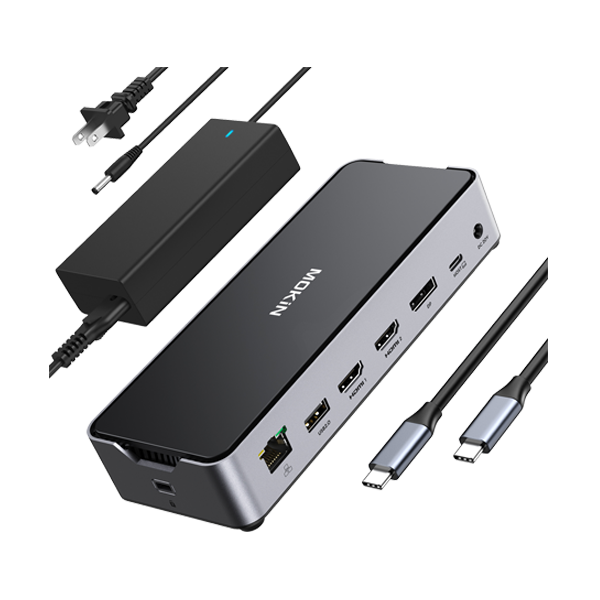


Simplify Your Desk with a Docking Station
Modern laptops offer incredible performance in slim profiles, but this streamlined design often sacrifices connectivity. Professionals, creatives, and power users frequently face a shortage of ports, limiting their ability to connect monitors, peripherals, and storage. A docking station serves as the central hub of your workspace, bridging the gap between your portable computer and a fully functional desktop environment.
At MOKiN, we focus on "Empowering Your Devices." We believe smart technology should be accessible, practical, and capable of redefining how you work. Our engineering team develops advanced connectivity solutions to ensure your hardware operates at its peak potential. By integrating a laptop docking station into your setup, you reclaim control over your workflow, reduce cable clutter, and maintain high efficiency.
The Strategic Advantage of a Centralized Hub
A cluttered desk often leads to a cluttered mind. Relying on multiple dongles and adapters creates a web of cables that hinders productivity. A dedicated dock consolidates these connections into a single unit. With one cable connecting to your laptop, you gain immediate access to external displays, Ethernet, USB peripherals, and power delivery.
This consolidation supports a "plug-and-play" lifestyle. You can transition from a mobile meeting to a stationary triple-monitor command center in seconds. MOKiN builds these ecosystems to support modern workflows, ensuring technical limitations never impede your output.
Thunderbolt 4 vs. USB-C: Identifying Your Needs
Selecting the correct dock requires understanding the interface capabilities of your computer. MOKiN offers specialized solutions for both Thunderbolt 4 and standard USB-C interfaces.
High-Bandwidth Performance for Power Users
For users demanding the fastest data transfer speeds and highest video resolution, Thunderbolt 4 is the superior choice. This technology supports 40Gbps bandwidth, allowing for uncompressed video transmission and rapid file transfers.
- MOKiN 16-IN-1 Thunderbolt™ 4 Laptop Docking Station: This unit represents the pinnacle of connectivity. It provides ample bandwidth for heavy data users who require simultaneous high-speed peripheral connections without lag.
- MOKiN 15-IN-1 Thunderbolt™ 4 Docking Station: Designed for efficiency, this model balances port variety with raw speed, ensuring your external drives and monitors perform as if they were connected directly to the motherboard.
- MOKiN 12-in-1 Thunderbolt 4 Laptop Dock Dual Monitors: A streamlined option for users who prioritize dual 4K display setups while maintaining the lightning-fast speeds of Thunderbolt architecture.
Universal Connectivity for Everyday Efficiency
Standard USB-C docks offer robust performance for general office work, coding, and content consumption. They provide excellent value and broad compatibility across various laptop brands.
- MOKiN 13 IN 1 Laptop USB C Dock Dual Monitor with 2 HDMI DisplayPort: This device is a workhorse for administrative tasks, allowing for flexible monitor configurations using HDMI or DisplayPort.
- MOKiN 8 IN 1 USB C Dock Dual 4K@60Hz DisplayPort: Perfect for users with specific display requirements who need a compact yet powerful solution for high-resolution output.
Expanding Your Visual Canvas: Multi-Monitor Support
Screen real estate correlates directly with productivity. Expanding your desktop across two or three screens allows for better multitasking—coding on one screen, documentation on another, and communication on a third.
Triple Monitor Configurations
For financial analysts, video editors, and developers, three screens are often a requirement, not a luxury.
- MOKiN 16-in-1 Laptop Docking Station for Triple Monitors: This comprehensive hub supports complex display arrangements, ensuring you can view all critical data points simultaneously.
- MOKiN 16-in-1 Laptop Docking Station with Triple Monitor Support: Engineered to manage the graphical load of three screens, this dock maintains stability and clarity across all extended displays.
- MOKiN 17-in-1 Triple Display Docking Station with Smart Display: Combining massive port expansion with visual feedback, this unit is built for the ultimate command center.
Overcoming Apple Silicon Limitations
Standard docking stations often struggle to extend multiple screens on MacBook Air or Pro models with base M1/M2/M3 chips due to OS limitations. DisplayLink technology solves this.
- MOKiN 15-in-1 DisplayLink Dual Monitor Docking Station: By utilizing DisplayLink drivers, this dock bypasses native limitations, allowing Apple users to extend their desktop across dual monitors effectively.
Innovation in Control: Smart Display Integration
MOKiN pushes the boundaries of standard electronics by integrating real-time status monitoring directly into the hardware. Knowing the status of your connections helps troubleshoot issues and confirms your devices are charging optimally.
- MOKiN 13-in-1 USB-C Laptop Docking Station with 2.26" Smart LCD Display: This unit features a built-in screen that visualizes connection status, removing the guesswork from your setup.
- MOKiN 13-IN-1 Laptop Docking Station with 2.26-inch LCD Smart Display: Similar to its counterpart, this dock offers a clear visual interface, reinforcing our value of making smart technology accessible and user-friendly.
Compact Solutions and Wireless Integration
Not every setup requires 15 ports. For users with smaller desks or those who value minimalism, integrating charging capabilities into the hub saves space and reduces cable count further.
- MOKiN 7-IN-1 USB C Hub with 15W Qi2 Wireless Charger: This hybrid device combines port expansion with high-speed wireless charging for your phone. It exemplifies our goal to simplify complex digital lifestyles, keeping your phone charged and your laptop connected simultaneously.
Comparative Analysis: Finding Your Match
Review the specifications below to identify the docking station that aligns with your hardware requirements.
| Product | Key Specs | Best For |
|---|---|---|
| MOKiN 16-IN-1 Thunderbolt™ 4 Laptop Docking Station | Thunderbolt 4 Interface, 40Gbps Speed, Quad Monitor Support (Windows). | Video Editors and Data Scientists requiring maximum bandwidth. |
| MOKiN 15-in-1 DisplayLink Dual Monitor Docking Station | USB-C/USB-A Interface, DisplayLink Technology. | MacBook Air/Pro (M1/M2/M3) users needing dual extended displays. |
| MOKiN 13-in-1 USB-C Laptop Docking Station with 2.26" Smart LCD Display | Built-in LCD Status Screen, Triple Display Support. | Tech Enthusiasts and IT Professionals who want visual data on their connections. |
| MOKiN 17-in-1 Triple Display Docking Station with Smart Display | Massive Port Expansion, Integrated Smart Display. | Power Users with extensive peripheral needs. |
| MOKiN 7-IN-1 USB C Hub with 15W Qi2 Wireless Charger | 15W Wireless Fast Charging, Single 4K Output. | Minimalists and Mobile Workers looking to reduce cable clutter. |
| MOKiN 8 IN 1 USB C Dock Dual 4K@60Hz DisplayPort | Dual 4K@60Hz Output via DisplayPort. | Designers and Streamers prioritizing high-resolution visuals. |
Optimizing Your Desk Setup
To fully benefit from your laptop docking station, consider the placement and cable management. Place the dock centrally, towards the back of the desk. This allows cables to run behind the desk, keeping the surface clear. Ensure your laptop's power adapter (or the dock's power supply) connects to a stable outlet to support Power Delivery (PD). Most MOKiN docks support pass-through charging, meaning your laptop charges while you work, eliminating the need to unpack your laptop charger daily.
By choosing MOKiN, you are not just buying a peripheral; you are investing in a more efficient, organized, and powerful working environment.