


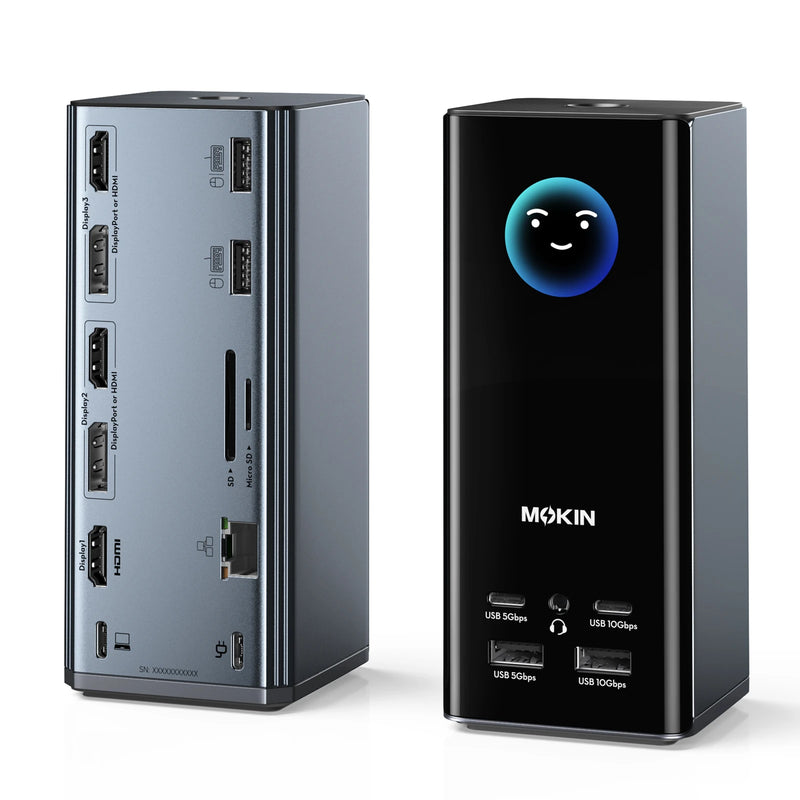


MOKiN 17-in-1 USB-C Docking Station for Triple Monitors with Smart LCD
Build a powerful desktop setup with multiple screens, expanded connectivity, and easy device management. Perfect for office work, remote setups, and content creation.
- Triple 4K Display for Windows Multitasking Workflows
- Real-time Weather at a Glance without Checking Your Phone
- Smart LCD Display with Screen Lock for Real-Time Monitoring and Control
PAY WITH EASE


17-in-1 USB-C Docking Station Triple Monitor


▪Multi-Display Flexible Configuration: With 3 HDMI and 2 DisplayPort outputs, you can easily set up various multi-monitor layouts, such as (2 HDMI + DP), (2 DP + HDMI), or (3 HDMI), to match your workflow.(Please note: Windows supports MST/SST, macOS only supports SST.)
▪Triple 4K Visual Display: Expand your workspace for productivity and entertainment. This USB-C docking station dual monitor setup supports up to three independent 4K@60Hz displays, delivering smooth, high-quality visuals for designers, developers, traders, and remote workers who rely on multi-screen efficiency for daily tasks. Connects via USB-C, USB4, or Thunderbolt for broad compatibility.


▪Smart System Monitor: Shows real-time charging wattage, resolution status, and port connection updates, helping professionals monitor performance at a glance during work, streaming, or multitasking.
▪Smart Weather Display: Built-in WiFi and an LCD screen that automatically syncs real-time local weather, helping users quickly decide what to wear or whether to carry an umbrella before leaving home.
▪Privacy Protection - Screen Lock Button: Double-tap to instantly turn off your screens, protecting sensitive information in shared or open office environments.
▪Stable Non-Slip Base: Built-in silicone suction pads on the bottom keep the dock firmly in place on your desk, ensuring a secure and organized workspace.


▪High-Speed Data Transfer: Equipped with 2×10Gbps USB-C/A ports and 2×5Gbps USB-C/A ports, supporting efficient file transfers and stable connections for daily work and multi-device setups.
▪Gigabit Ethernet Connection: Provides a stable 1000Mbps wired network connection for online meetings, large file transfers, and everyday connectivity needs.
▪USB-C Power Delivery Charging: The USB-C PD port supports up to 100W power input and up to 85W laptop pass-through charging. A 100W or higher power adapter is recommended for optimal performance. (Note: Charger not included.)
▪SD and microSD Card Reader: Supports transfer speeds up to 104MB/s, providing convenient access to photos, videos, and files from cameras and storage devices.


